
What do i plug the usb end into ?

Page may contain affiliate links. Please see terms for details.

Dave7

Legendary Member
Location
Cheshire
Obviously to most (though not to me) this is a charger for a small device.
I have never seen a charger with a magnetic connection but its obvious where that goes
BUT......what do i plug the usb end into ?
Also...... does whatever i plug it into in to, in turn have to be plugged into a power source.
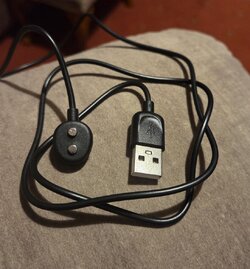
20260115_165633.jpg
 

Binky

Über Member
Obviously to most (though not to me) this is a charger for a small device.
I have never seen a charger with a magnetic connection but its obvious where that goes
BUT......what do i plug the usb end into ?
Also...... does whatever i plug it into in to, in turn have to be plugged into a power source.
View attachment 797825

Pretty much any device with a USB port will do so laptop, desktop PC, even a car these days have them. Otherwise a phone plug will do which you plug into a wall socket which has USB outlet.
 
OP
OP
Dave7

Dave7

Legendary Member
Location
Cheshire
Pretty much any device with a USB port will do so laptop, desktop PC, even a car these days have them. Otherwise a phone plug will do which you plug into a wall socket which has USB outlet.

Daft question but if eg i plug it into a laptop does the LT have to be switched on ?
 

si_c

Guru
Location
Wirral
Usually yes. And not a daft question.

Yeah, but it is laptop specific. Some laptops will continue to charge a device if the laptop is put to sleep after charging has started.

Similarly, my PC has several USB ports for which power is provided when the computer is off.
 

markemark

Veteran
The usb power from a laptop is very low. A plug similar to shown above will charge a lot quicker which may or may not be important to you.
 
There are some variations. Some phones moan about power from the USB socket being too low for their charging. Mine mostly moan but get charged eventually anyway. I think some may refuse point blank. Depends therefore what you have on the other end and what power it requires. There's a lot more detail to it and someone will probably explain, but for practical purposes I think there are two levels that you are likely to encounter?
 

markemark

Veteran
I have just found a plug with a slot that the cable/usb will fit. So i assume that is the solution i need ??
If so then thank you all for your help.

Yes. If it fits it’ll work. Assuming the device you’re charging is in working order.
 

Dadam

Über Member
Location
SW Leeds
Also depends on the charging power the device needs. If it's more than the plug can provide, it may still charge but slowly.
 
OP
OP
Dave7

Dave7

Legendary Member
Location
Cheshire
There are some variations. Some phones moan about power from the USB socket being too low for their charging. Mine mostly moan but get charged eventually anyway. I think some may refuse point blank. Depends therefore what you have on the other end and what power it requires. There's a lot more detail to it and someone will probably explain, but for practical purposes I think there are two levels that you are likely to encounter?

I have gone through the (very basic) instruction and it says nothing about charging.
Its a small device and there will be no rush ie i could leave it on charge all day.
Again, thanks for the advice/help.
 

lazybloke

Chocolate eclairs: the peak of human endeavour
Location
Leafy Surrey
There are some variations. Some phones moan about power from the USB socket being too low for their charging.

It's a device with a usb A plug, so i doubt it's a phone!

The original dumb USB A port could only deliver 2.5 watts. I think later enhancements allow 10 or 12 watts.

An appropriate USB C port can deliver well over 200 watts; the device has to request/negotiate this.


As for charging from a laptop when it's switched off, the "BIOS" is usually where you activate this capability.
 
Top Bottom