
My new bank card will let me buy stuff at a checkout, but won't let me access my account from an ATM

Page may contain affiliate links. Please see terms for details.

Accy cyclist

Legendary Member
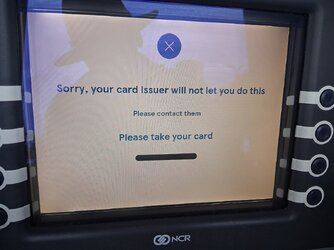
As above. After being robbed of my bank card 8 days ago the replacement one finally came today. I tried to use it in a ATM but it wouldn't let me look at anything or let me withdraw money. On asking a member of staff on a checkout in the local Tesco to see if it worked that way, after she told me to key in my 4 digits it worked. I then thought it'd been activated, but on trying it in the ATM again it still wouldn't work. I even tried it in the local Post Offices ATM but still no luck! What could be wrong with it I wonder?🤔

Below is what I saw when trying to access my account.
 

Attachments
  • 20250704_193709.jpg
    20250704_193709.jpg
    150.2 KB · Views: 0
Last edited:

Webbo2

Über Member
When you get a new card. It should be followed by a letter with a pass word which once you input allows you to change it.
This may however be something that one did in ancient times and now be differen.
 
As above. After being robbed of my bank card 8 days ago the replacement one finally came today. I tried to use it in a ATM but it wouldn't let me look at anything or let me withdraw money. On asking a member of staff on a checkout in the local Tesco to see if it worked that way, after she told me to key in my 4 digits it worked. I then thought it'd been activated, but on trying it in the ATM again it still wouldn't work. I even tried it in the local Post Offices ATM but still no luck! What could be wrong with it I wonder?🤔

Below is what I saw when trying to access my account.

Contact your bank for advice!
 

Stevo 666

Über Member
Go into a branch and let them check the card. Happened to me once and turned out the little chip thing was damaged.
 

pjd57

Guru
Location
Glasgow
I was dubious about using my phone instead of the card.
But after hearing Martin Lewis talk about it , I have started doing it.
Fingerprint required. Definitely much better option.
 

Dave7

Legendary Member
Location
Cheshire
I was dubious about using my phone instead of the card.
But after hearing Martin Lewis talk about it , I have started doing it.
Fingerprint required. Definitely much better option.

How does that work?
I regularly see people hold their phone to the card reader/swipe thingy but no idea how it works.
 

Paulus

Started young, and still going.
Location
Barnet,
How does that work?
I regularly see people hold their phone to the card reader/swipe thingy but no idea how it works.

Possibly Google pay. It can be activated on most smart phones. It uses whichever bank card you input into it.
 

markemark

Veteran
How does that work?
I regularly see people hold their phone to the card reader/swipe thingy but no idea how it works.

You associate your card with your phone. Googlepay and Apple pay make this quite easy
You have to unlock your phone before making a payment. How you unlock you phone depends on the phone and how you have set it up to unlock. Usually face-id, fingerprint or passcode.
 

presta

Legendary Member
Contact your bank for advice!
Not necessarily helpful, when HSBC sent me a new card the covering letter said that they hadn't changed the PIN, but they had. It took about 2-3 weeks of me humouring their suggestions one after another before they finally sent me another new PIN and then the problem was solved.
 
Top Bottom